

HTTP APIs as Tools
Most of the capabilities an AI agent needs already exist behind an ordinary REST API. Standing up and operating a dedicated MCP server just to wrap that API in tool calls is pure overhead: another process to deploy, another codebase to keep in sync with the API it wraps.
The Problem
Not every upstream a team wants to expose to an agent has, or will ever have, an MCP server in front of it. Requiring one before an API can be used as a tool means every integration starts with a wrapper project instead of a routing rule.
How Zilla Solves It
The mcp-http · proxy binding exposes an HTTP API directly as MCP tools, with no MCP server needed upstream. Each tool is named in configuration, validated by a schema converter, and mapped by a route to the upstream HTTP request that fulfills it. It slots into the same mcp · proxy routing layer as mcp · client, so from the agent's perspective a toolkit backed by a REST API is indistinguishable from one backed by a real MCP server: both show up in the same unified tool list, addressed the same way.
payments_http_proxy:
  type: mcp-http
  kind: proxy
  options:
    tools:
      get_payment_status:
        description: Look up the status of a payment by identifier.
        schemas:
          input:
            model: json
            catalog:
              payments_catalog:
                - subject: get_payment_status_params
                  version: latest
  routes:
    - when:
        - tool: get_payment_status
      exit: sys:http_client
      with:
        headers:
          ":method": GET
          ":scheme": http
          ":authority": payments-api:8080
          ":path": /payments/${args.paymentId}
Architecture
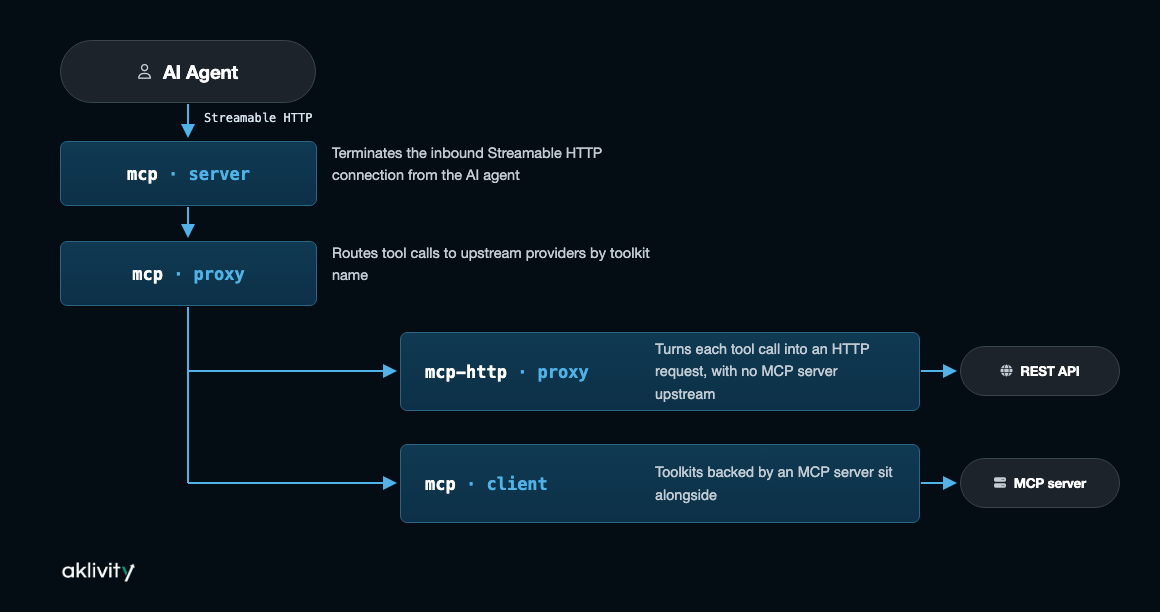
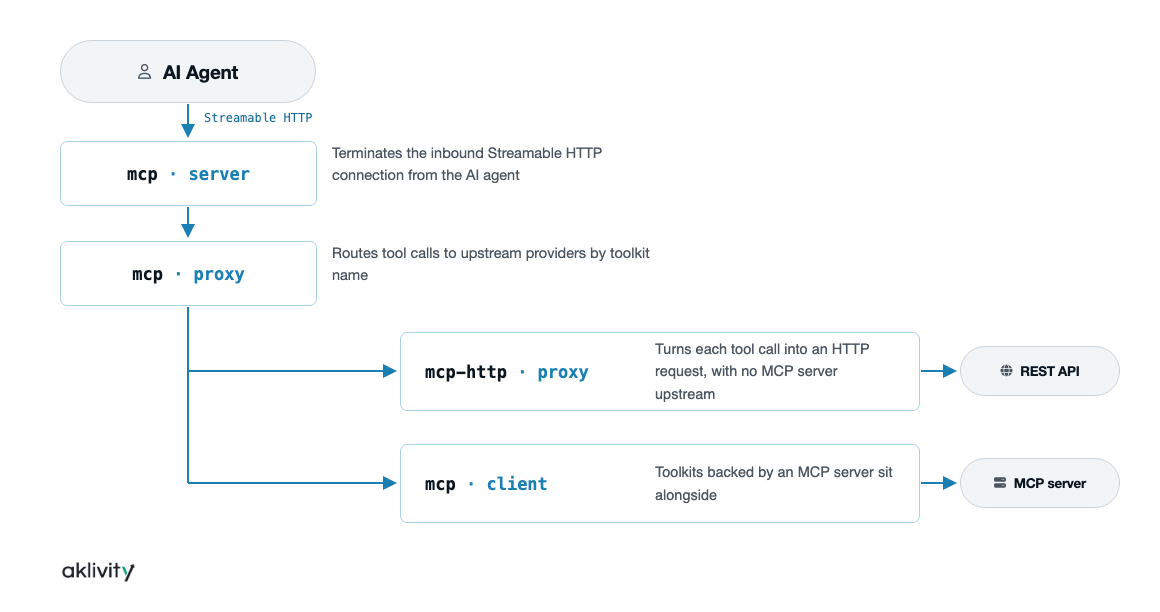
mcp · proxy doesn't distinguish between the two kinds of exit when routing. A route matches on toolkit, exactly as it would for an mcp · client exit; which binding sits on the other side of that exit is an implementation detail the agent never sees.
Configuration
Route a toolkit to mcp-http · proxy the same way you'd route it to an mcp · client, by toolkit name. Inside mcp-http · proxy, each tool is named under options.tools, and a route maps tools/call for that tool name to an upstream HTTP request:
north_mcp_proxy:
  type: mcp
  kind: proxy
  routes:
    - exit: bluesky_mcp_client
      when:
        - toolkit: bluesky
    - exit: payments_http_proxy
      when:
        - toolkit: payments

bluesky_mcp_client:
  type: mcp
  kind: client
  options:
    server: http://bluesky-mcp:3001/mcp
  exit: sys:http_client

payments_http_proxy:
  type: mcp-http
  kind: proxy
  options:
    tools:
      get_payment_status:
        description: Look up the status of a payment by identifier.
        schemas:
          input:
            model: json
            catalog:
              payments_catalog:
                - subject: get_payment_status_params
                  version: latest
      refund_payment:
        description: Refund a previously captured payment.
        summary: "Refund ${result.refundId} is ${result.status}"
        schemas:
          input:
            model: json
            catalog:
              payments_catalog:
                - subject: refund_payment_params
                  version: latest
          output:
            model: json
            catalog:
              payments_catalog:
                - subject: refund_payment_result
                  version: latest
  routes:
    - when:
        - tool: get_payment_status
      exit: sys:http_client
      with:
        headers:
          ":method": GET
          ":scheme": http
          ":authority": payments-api:8080
          ":path": /payments/${args.paymentId}
    - when:
        - tool: refund_payment
      exit: sys:http_client
      with:
        headers:
          ":method": POST
          ":scheme": http
          ":authority": payments-api:8080
          ":path": /payments/${args.paymentId}/refunds
        body:
          model: json
          catalog:
            payments_catalog:
              - subject: refund_payment_body
                version: latest
The bluesky toolkit is backed by a real upstream MCP server via mcp · client. The payments toolkit is backed directly by a REST API via mcp-http · proxy: get_payment_status maps a GET request to a path built from the tool call's arguments, and refund_payment maps a POST request whose body is projected from the arguments by a schema converter, pruning out paymentId since it's already in the path. Both toolkits appear side by side in the agent's tool list.
See Virtual Server for how it fits alongside mcp · client exits in a larger routing table.
Resources, Static and Templated
Not every HTTP GET should be a tool. options.resources maps a GET request to an MCP resource instead, and whether it's a fixed entry in resources/list or a resources/templates/list entry depends entirely on the resource's uri:
options:
  resources:
    order:
      uri: "order://{orderId}"
      description: Customer order by identifier
      mimeType: application/json
      schemas:
        output:
          model: json
          catalog:
            payments_catalog:
              - subject: order_result
                version: latest
A uri with no captures, such as orders://recent, is a static resource, listed once in resources/list. A uri with one or more {capture} placeholders, like order://{orderId} above, is a resource template, listed in resources/templates/list and read with a concrete value substituted in. Captured values are available to the route resolving the request as ${params.x}, the same way a tool's arguments are available as ${args.x}.
See the mcp-http proxy reference for the full set of options.
Editions
mcp-http · proxy, including static and templated resources, is fully open source. Guarding a toolkit built on it follows the same rules as any other: the open-source jwt guard for inbound auth, and the Zilla Plus oauth guard if the route also needs Client Credentials or Token Exchange for an outbound call — see OAuth Guard.
Try It
Try the example
Walk through HTTP APIs as Tools for the runnable steps: routing a toolkit straight to a REST API with mcp-http · proxy, no MCP server in front of it.