

Scale MCP Gateway
A single Zilla instance can carry meaningful agent traffic on its own, but production deployments eventually need more than one: for redundancy, for capacity, or simply to survive a node restart without downtime. Scaling MCP Gateway horizontally means asking one question: does anything in this pipeline depend on which specific instance handles a request?
Zilla Plus
Running MCP Gateway with a Redis- or Hazelcast-backed store requires Zilla Plus. The memory store below is fully open source.
The Problem
Naively running multiple copies of a gateway can turn per-instance state into a correctness problem. If two replicas each keep their own local cache of an upstream's tool listing, they can disagree, one agent connection sees a stale list while another sees a fresh one. If auth state lives only in the process that first validated it, a load balancer has to pin every request from a given client to that same instance, defeating the point of having multiple replicas.
How Zilla Solves It
Zilla's MCP Gateway is stateless on the request path itself. The two things that would otherwise need to live somewhere, the listing cache and auth state, are held in a configured store rather than in process memory. Any replica reading and writing to the same store sees the same cache entries and the same auth state as every other replica.
What lives in the store:
- Listing cache: the merged
tools/list,prompts/list, andresources/listresults, keyed with the configured TTL. See Listing Cache. - Auth state: JWKS keys, nonces, and session tokens tracked by the OAuth guard. See Centralized Auth.
Architecture
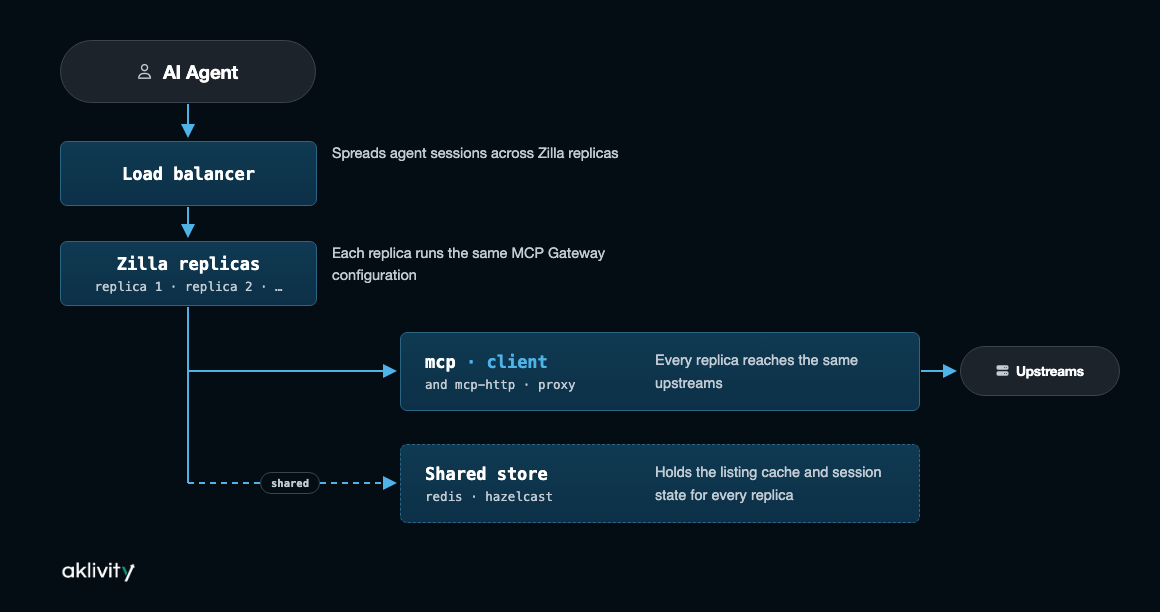
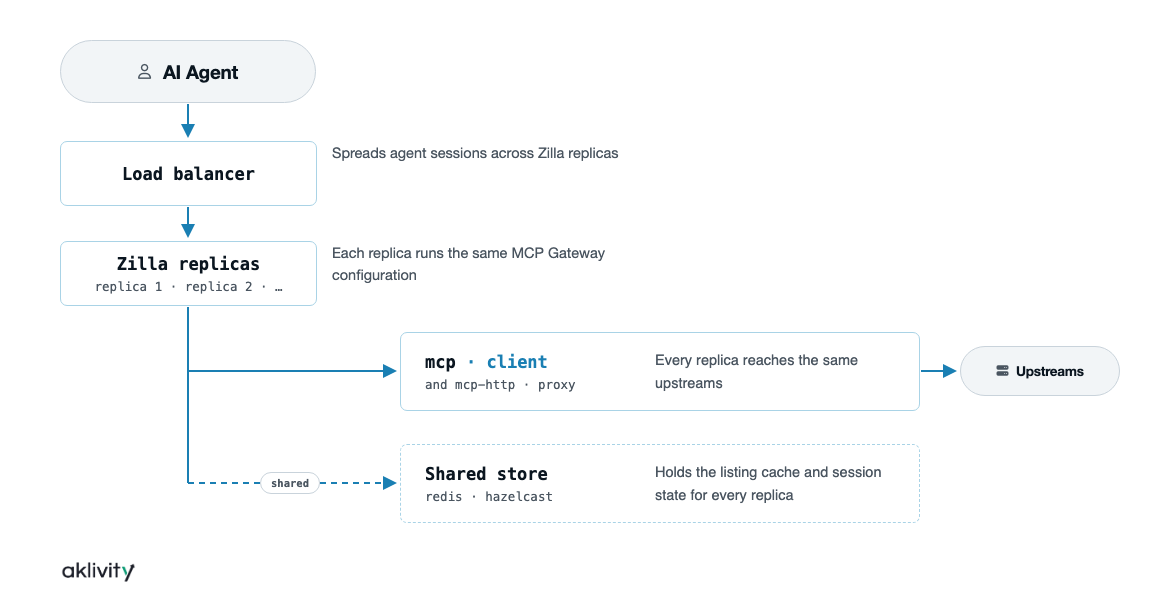
Because the cache and auth state live in the shared store, not in R1 or R2 individually, the load balancer can route any request to any replica.
Tips
This page covers scaling instances: running more than one Zilla process to handle more traffic. Scaling the tool list itself, keeping tools/list short as more toolkits are aggregated, is a different, unrelated axis. See Tool Discovery.
No Sticky Sessions Required
With the listing cache and auth state externalized, there's no reason for a load balancer to pin a client to a specific replica. A request that lands on R1 and a request that lands on R2 see the same cached tool listing and the same auth decisions, because both are reading from the same store. Replicas can be added or removed to match load without warming a fresh cache or migrating in-flight sessions.
From Memory to a Distributed Store
A single-node deployment uses the memory store, data lives in that one process and resets on restart:
stores:
  cache:
    type: memory
For multiple replicas, point the same store name at Redis or Hazelcast instead. Nothing else in the pipeline changes, north_mcp_proxy still references the store by name:
stores:
  cache:
    type: redis
    options:
      url: rediss://redis.example.com:6380
      default-ttl: PT5M
Editions
| Component | Community | Plus |
|---|---|---|
memory store, single instance | ✓ | — |
redis / hazelcast store, shared across replicas | — | ✓ |