

Brokers
The Brokers tab shows the operational state of all Kafka brokers in your cluster.
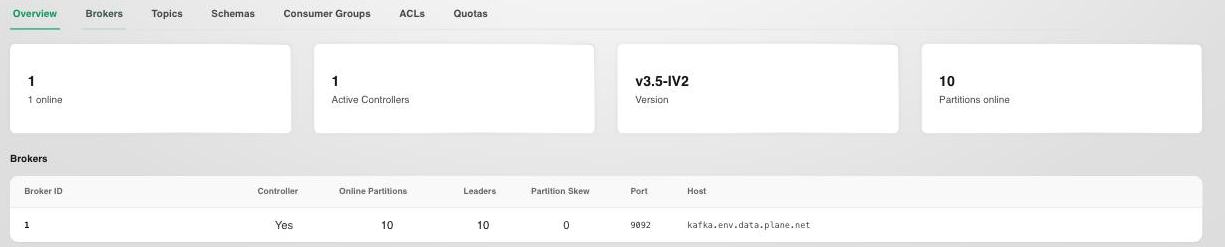
Overview
Displays cluster-wide health at a glance:
- Broker count: total number of brokers, and how many are currently online.
- Active controllers: the number of brokers currently acting as the cluster controller. This should be exactly one; zero means the cluster can't process metadata changes, and more than one signals a split-brain condition.
- Version: the Kafka version running across the cluster.
- Partitions online: number of partitions currently online.
Broker Details
The broker table lists, per broker:
- Broker ID: the broker's numeric identifier.
- Controller: whether this broker is the active controller.
- Online partitions and Leaders: how many partitions this broker has online, and how many of those it leads.
- Partition skew: how far this broker's leader count deviates from an even distribution. A high skew means traffic is concentrated on this broker instead of spread across the cluster.
- Port and Host: the broker's advertised listener address.
Warning
A broker with zero active controllers cluster-wide, or a persistently high partition skew, is an early indicator of broker instability. Investigate immediately to avoid data loss or hotspotting.
Use this view to identify overloaded brokers and plan partition reassignments.